


• Home
  • News
  • Personal Finance
    • Savings
    • Banking
    • Mortgage
    • Retirement
    • Taxes
    • Wealth
  • Make Money
  • Budgeting
  • Burrow
  • Investing
  • Credit Cards
  • Loans

Subscribe to Updates

Get the latest finance news and updates directly to your inbox.

Top News

4 Ways Costco Is Changing How You Shop in 2026

January 29, 2026

Making Money While You Sleep: 44 Simple Ideas to Create Passive Income

January 29, 2026

5 Resources For Long Life Learning

January 29, 2026
Facebook Twitter Instagram
Trending
  • 4 Ways Costco Is Changing How You Shop in 2026
  • Making Money While You Sleep: 44 Simple Ideas to Create Passive Income
  • 5 Resources For Long Life Learning
  • The New Senior Deduction Could Slash Your Taxes by Over $1,000 — How to Tell Exactly How Much It Saves You
  • Social Security’s ‘Lump Sum’ Option: Why Taking a Check Now Could Cost You Later
  • Pre-Tax IRA To 401(k) Transfers
  • The 10 Golden Rules for Organizing and Decluttering Your Home
  • I’ve Been Investing for 45 Years: 5 Dumb Mistakes Nearly Every Investor Makes
Thursday, January 29
Facebook Twitter Instagram
FintechoPro
Subscribe For Alerts
  • Home
  • News
  • Personal Finance
    • Savings
    • Banking
    • Mortgage
    • Retirement
    • Taxes
    • Wealth
  • Make Money
  • Budgeting
  • Burrow
  • Investing
  • Credit Cards
  • Loans
FintechoPro
Home » You can now exchange numbers just by tapping iPhones together. Here’s how to use it
News

You can now exchange numbers just by tapping iPhones together. Here’s how to use it

News RoomBy News RoomOctober 21, 20233 Views0
Facebook Twitter Pinterest LinkedIn WhatsApp Reddit Email Tumblr Telegram

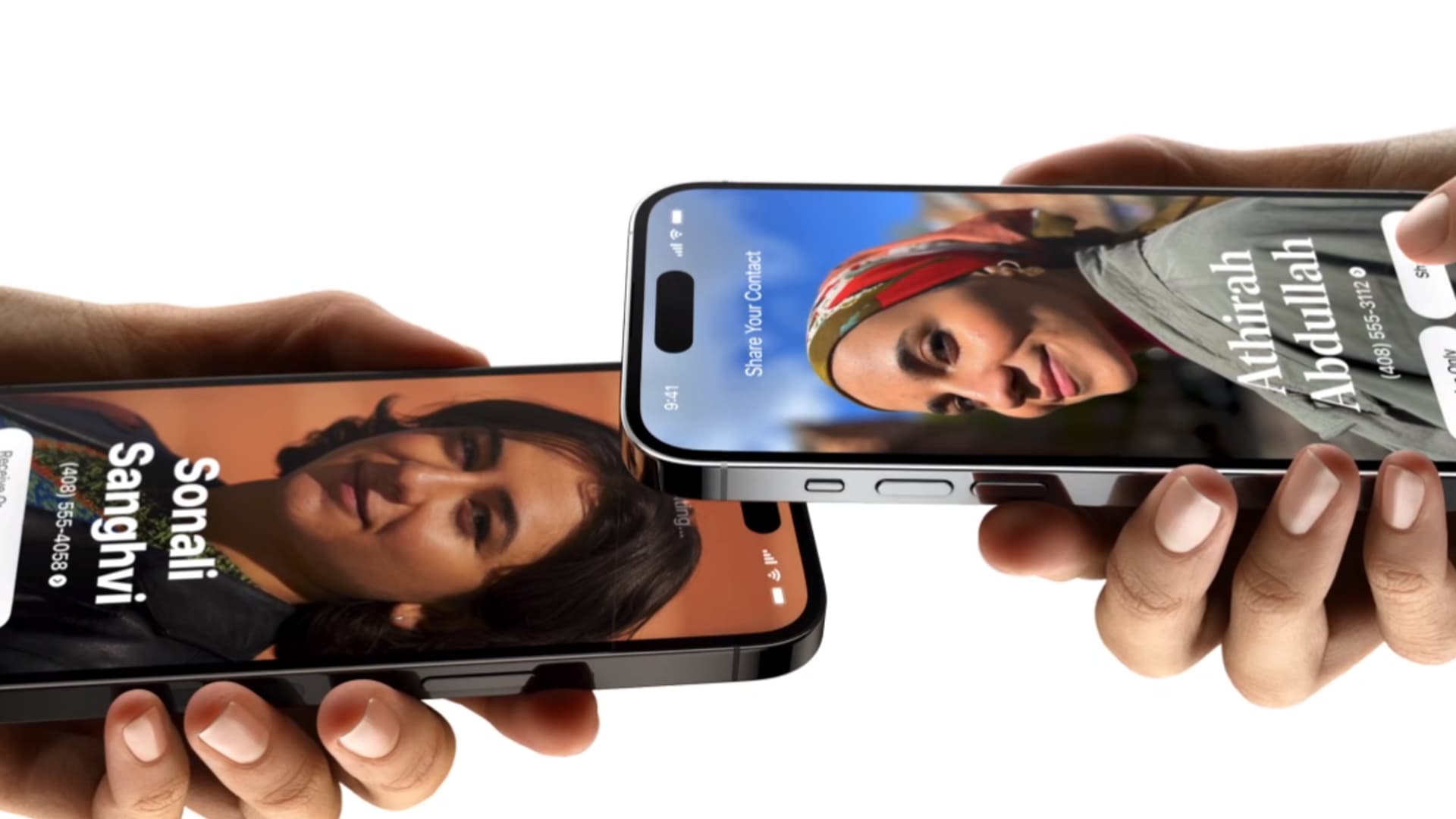
The next time you are at a networking event or dinner party, you can exchange phone numbers with a new colleague or friend just by holding your iPhones near each other.

The feature, known as NameDrop, became available when Apple rolled out iOS 17 in September.

NameDrop is faster than reciting numbers out loud or trading phones and manually punching in contact information. Plus, you don’t have to worry about misspelling your new contact’s name. It just transfers right into your phone.

Apple lets you choose what you share with someone when you use NameDrop, so you won’t accidentally give away sensitive information you might have stored on your phone such as a home address. One drawback: You can’t share your email and phone number at the same time, and you can only NameDrop once between two phones unless you delete the contact and start over.

Here’s how to try it for yourself.

How to use NameDrop in iOS 17 on iPhone to exchange contacts

  • Unlock your iPhone (the feature will not work with your phone locked).
  • Hover the top of one phone just above the top of another phone, like in the picture at the top of this story.
  • Wait roughly three seconds and a prompt will pop up on your screen.
  • You can press “Receive Only” or “Share,” and you can press the down arrow to choose which of your contact information you are about to send.
  • You should both press “Share” to get each other’s contact information.
  • If only one of you needs the contact information, that person should press “Receive Only.” The other person still needs to press “Share” to consent.
  • If you get to this stage and realize you do not want to do either, just swipe up to get out of NameDrop.
  • Once you receive the new contact, you’ll see a contact page. You can tweak the contact in any way you would like, but if it looks good to you, just press “Done” in the top left.

Read the full article here

Share. Facebook Twitter Pinterest LinkedIn Tumblr Email

Related Articles

RSS Feed Generator, Create RSS feeds from URL

News November 22, 2024

X CEO Linda Yaccarino addresses Musk’s ‘go f—- yourself’ comment to advertisers

News November 30, 2023

67-year-old who left the U.S. for Mexico: I’m happily retired—but I ‘really regret’ doing these 3 things in my 20s

News November 30, 2023

U.S. GDP grew at a 5.2% rate in the third quarter, even stronger than first indicated

News November 29, 2023

Americans are ‘doom spending’ — here’s why that’s a problem

News November 29, 2023

Jim Cramer’s top 10 things to watch in the stock market Tuesday

News November 28, 2023
Add A Comment

Leave A Reply Cancel Reply

Demo
Top News

Making Money While You Sleep: 44 Simple Ideas to Create Passive Income

January 29, 20260 Views

5 Resources For Long Life Learning

January 29, 20261 Views

The New Senior Deduction Could Slash Your Taxes by Over $1,000 — How to Tell Exactly How Much It Saves You

January 28, 20261 Views

Social Security’s ‘Lump Sum’ Option: Why Taking a Check Now Could Cost You Later

January 28, 20260 Views
Don't Miss

Pre-Tax IRA To 401(k) Transfers

By News RoomJanuary 28, 2026

The regular rollover process is well-known: electing to move funds from an employer 401(k) to…

The 10 Golden Rules for Organizing and Decluttering Your Home

January 27, 2026

I’ve Been Investing for 45 Years: 5 Dumb Mistakes Nearly Every Investor Makes

January 27, 2026

IRS Gives IRA Providers More Time To Implement SECURE 2.0 Changes

January 27, 2026
Facebook Twitter Instagram Pinterest Dribbble
  • Privacy Policy
  • Terms of use
  • Press Release
  • Advertise
  • Contact
© 2026 FintechoPro. All Rights Reserved.

Type above and press Enter to search. Press Esc to cancel.